Sunday, December 13, 2009

Smb4k "org.freedesktop.DBus.Error.NoReply" problem in Kubuntu Karmic Koala

I was trying to start Sbm4k today and after running the command I noticed that the application was doing nothing besides creating an entry in the task bar that disappears in a while. After executing Smb4k from the console I got the following error:

(4408)/: Communication problem with  "smb4k" , it probably crashed.
Error message was:  "org.freedesktop.DBus.Error.NoReply" : " "Message did not receive a reply (timeout by message bus)" " 


Well it seems that there is a bug related to this problem in launchpad that has been fixed but obviously doesn't work in my system and after reading for a while I found the following suggestion:

"remove the ~/.kde4/share/apps/smb4k/custom_options.xml"

Smb4k is running on an infinite loop mounting things on startup. In my system I couldn't find such file and I noticed that I have the fixed version of this application as described in the launchpad bug, but since this is the first time I run Smb4k since the update, the old setting that was causing the bug was still being used and it was trying to remount old bookmarked  locations on startup hence falling in the infinite loop.

The solution in my case was to rename the bookmark file before starting smb4k:

"/.kde/share/apps/smb4k$ mv bookmarks.xml bookmarks.xmlBAK"

Then changing it back to its previous name, I hope it helps ;)


Saturday, November 28, 2009

Eclipse button problem with Kubuntu 9.10 (Karmic Koala)

I ran into this issue while installing the Google App Engine... a quick description of the problem is that some buttons in Eclipse were not responding (doing nothing) after I upgraded to Karmic Koala, after checking the log file, network connection settings and some other things that didn't work I decided to ask the oracle (Google) about it and after a while I found a simple and quick solution here.

Just create an executable file with the following content:

 #!/bin/sh  
 export GDK_NATIVE_WINDOWS=1  
 /opt/eclipse-3.5/eclipse  

Now back to coding ;)

Eclipse Galielo and Google App Engine Plugin

I just installed Galileo and I went straight to the update site to install Google App Engine plugin but for some reason after adding the site (http://dl.google.com/eclipse/plugin/3.5) and following the instructions, Galileo simply didn't do ANYTHING after I clicked on the "Next" button, anyway I found the zip files here and it is just as simple as any other plugin.


  1. Download the zip file here for you version.
  2. Unzip it at the "dropins" folder in your Eclipse (Galileo) directory.
  3. Restart Eclipse
That's it ;)

Thursday, November 26, 2009

Windows Task Manager through command prompt

Today I was playing my CSI role as a software developer, also known as: fixing a possible bug, that ended up being a configuration problem. It took a couple of remote desktop sessions to reach the the right environment and finally there I couldn't open Windows Task Manager with the normal shortcut "CTRL + SHIFT + ESC",  so I had to do it through MS-DOS command prompt, this is quite easy but still everyone forgets about it or maybe just don't know it, honestly I will be the first one to forget it, so I decided to share it with the world and at the same time keep the knowledge in a safe place.


Sunday, November 22, 2009

How to disable Kubuntu login sound

I don't know about you, but in my case the login sound can be a problem at home while rebooting the system when my wife is sleeping, so I took a couple of minutes to find out how to disable it and here it is.
 
  1. Go to "System Settings"
  2. Click on "Notifications"
  3. Select "KDE System Notifications" from the drop-down menu
  4. Find the "Login" event
  5. Untick the "Play a sound" option and that's it.
Here you can check the screenshot


Friday, November 20, 2009

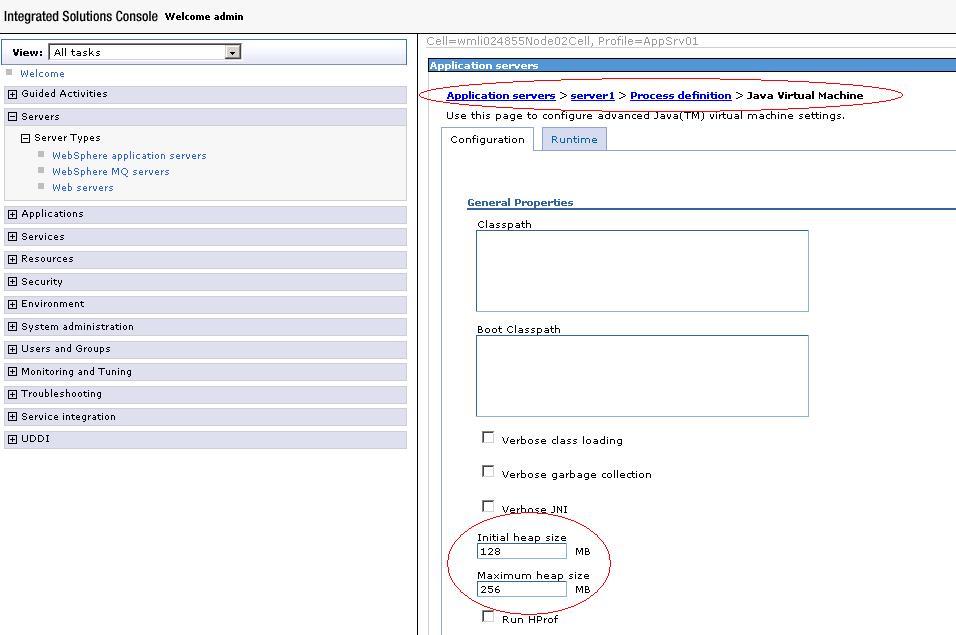
Setting Java Virtual Machine memory heap size for your server

Do you need to set the heap size (min and max) available for the java virtual machine being used by your server? well I ran into that annoying OutOfMemoryError message today and I took a couple of screenshots describing how to do it, check it out.

Here you can see WebSphere's console:


In this other case I used Eclipse, you can check how to set the values in the virtual machine parameters at the server connector tab for Geronimo:


Thursday, November 19, 2009

Java version being used by your server

Today I was solving an issue on different environments and I had to check the Java version being used in BEA Weblogic, IBM WebSphere and Apache Geronimo, it is not difficult but again I thought it would be useful to share it with everyone.

Here you can see how to check the Java version through the log in the Weblogic console:


In this case for WebSphere, you can see where to find the version by directly checking the log file:

The final screenshot is from Geronimo, with a lot of information about Java: