Showing posts with label error. Show all posts

Sunday, July 25, 2010

Internet Explorer giving a run-time error when executing object.innerHTML

By any chance did you get an “unknown run-time error” while using the following javascript method object.innerHTML=”yourhtml” in Internet Explorer? well I just did and obviously the very helpful (sarcastic) message by Microsoft didn't help at all.

Fortunately the solution is quite simple, for example in this case:

 document.getElementById('cartAddSpecContent').innerHTML = spec;  

All you have to do is to replace the 'cart'AddSpecContent' element (that used to be a

 <p>  

) for a block-level one like

 <div>  

and that's it ;)

Friday, March 12, 2010

Can't load PHP's mcrypt extension?

After installing MySQL and PHP, both were working correctly and the only thing missing was to install phpMyAdmin. After downloading and unzipping the installation file I try to access the application through the browser and I get this error:

"Cannot load mcrypt extension"

This can be solved quite easily:

  1. Open your php.ini file (e.g. c://php5/php.ini or c://windows/php.ini)
  2. Find and uncomment "extension=php_mcrypt.dll", save the file.
  3. Copy "libmcrypt.dll" from your php folder to "c://windows"
  4. Restart the server
That's it!

Thursday, January 21, 2010

JavaFX Eclipse plugin error

If you decided to give it a try to JavaFX using Eclipse you may run into your first problem right after installing the JavaFX plugin for Eclipse and it may look like these errors:

Cannot access java.lang.Object class file for java.lang.Object not found
Invalid assignment
Package javafx.scene does not exist
Package javafx.stage does not exist

First of all make sure that you added correctly the JavaFX SDK to your libraries:


If this is correct then take a look at your ".classpath" file and make sure that the JavaFX entry looks like this:

      <classpathentry kind="con" path="com.sun.javafx.eclipse.core.classpath.SDKClasspathContainer"/>  

And not like this:

      <classpathentry kind="con" path="com.sun.javafx.eclipse.core.classpath.SDKClasspathContainer/reserved/desktop"/>  

That fixed it for me ;)

Sunday, December 13, 2009

Smb4k "org.freedesktop.DBus.Error.NoReply" problem in Kubuntu Karmic Koala

I was trying to start Sbm4k today and after running the command I noticed that the application was doing nothing besides creating an entry in the task bar that disappears in a while. After executing Smb4k from the console I got the following error:

(4408)/: Communication problem with  "smb4k" , it probably crashed.
Error message was:  "org.freedesktop.DBus.Error.NoReply" : " "Message did not receive a reply (timeout by message bus)" " 


Well it seems that there is a bug related to this problem in launchpad that has been fixed but obviously doesn't work in my system and after reading for a while I found the following suggestion:

"remove the ~/.kde4/share/apps/smb4k/custom_options.xml"

Smb4k is running on an infinite loop mounting things on startup. In my system I couldn't find such file and I noticed that I have the fixed version of this application as described in the launchpad bug, but since this is the first time I run Smb4k since the update, the old setting that was causing the bug was still being used and it was trying to remount old bookmarked  locations on startup hence falling in the infinite loop.

The solution in my case was to rename the bookmark file before starting smb4k:

"/.kde/share/apps/smb4k$ mv bookmarks.xml bookmarks.xmlBAK"

Then changing it back to its previous name, I hope it helps ;)


Friday, November 20, 2009

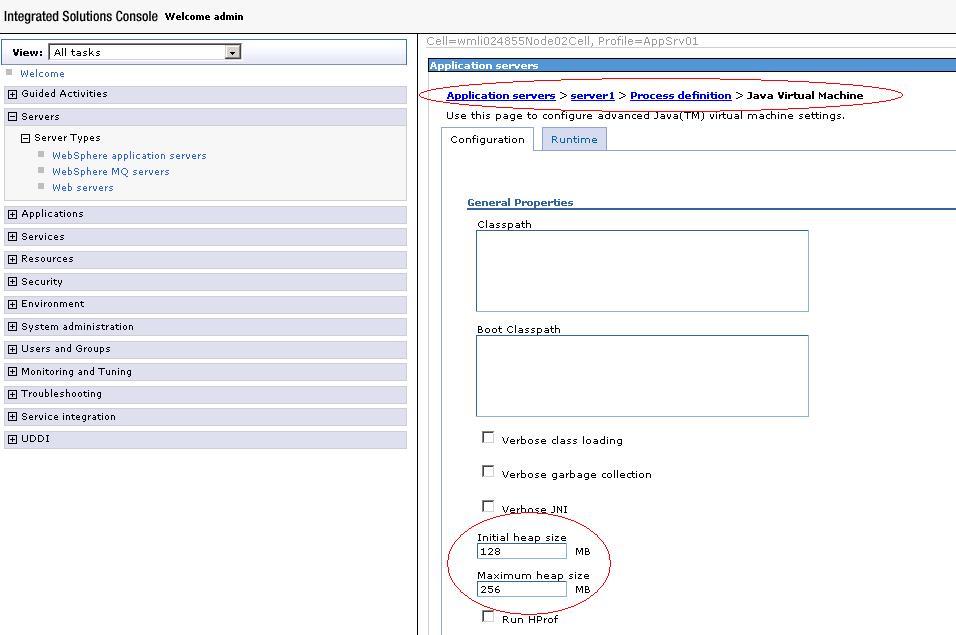
Setting Java Virtual Machine memory heap size for your server

Do you need to set the heap size (min and max) available for the java virtual machine being used by your server? well I ran into that annoying OutOfMemoryError message today and I took a couple of screenshots describing how to do it, check it out.

Here you can see WebSphere's console:


In this other case I used Eclipse, you can check how to set the values in the virtual machine parameters at the server connector tab for Geronimo:


Tuesday, November 17, 2009

Javac OutOfMemory error while compiling with Ant

Did you get this OutOfMemory error message from javac  while compiling with ant:

“The system is out of resources.
Consult the following stack trace for details.
java.lang.OutOfMemoryError: Java heap space”

Well there is an easy way to fix it! first set property “fork” to true, this will allow javac to execute in a separate thread with its own resources, then you can set the values for “memoryinitialsize” and “memorymaximumsize” according to your needs. Here is a sample of how the javac task would look.

 <javac  
     fork="true"
     srcdir="${basedir}/src"  
     destdir="${basedir}/build/classes"  
     classpath="${project.classpath}"  
     memoryinitialsize="256m"  
     memorymaximumsize="256m"
 />  

That’s it! I hope it helps ;)

Sunday, November 1, 2009

Upgrade to Karmic Koala (Kubuntu 9.10)

The new version Karmic Koala was just released this week and I took a few hours during the weekend to upgrade my system. The download and install process through the upgrade manager went out perfectly until I had to restart and noticed the following errors:

"init:sreadahead main process terminated with status 1 init"

and

"One or more of the mounts listed in /etc/fstab cannot yet be mounted: 
(ESC for recovery shell)
/: waiting for /dev/disk/by-uuid/xxxxxxxx-xxxx-xxxx-xxxx-xxxxxxxxxxxx"

To solve the first issue find the follwing lines in your /etc/init/sreadahead.conf file

start on starting mountall
stop on stopped rc”


And replace the first line like this:

#start on starting mountall
start on filesystem”

To solve the second issue edit the following in your /etc/fstab file:

- Disable fsck on vfat by setting to "0" the value in the last column of you vfat entry this way

UUID=XXXX-XXX /media/hda1 vfat defaults,utf8,umask=007,gid=46 0 0”

- Replace all UUID by /dev/sdxx

After this changes the error was still there, then I noticed that during startup my old kernels were the only option in the grub menu and I couldn´t access the one installed during the upgrade. Googling the issue resulted in a forum thread that describes this solution:

- Make your devices writable again:
“mount -n -o remount,rw /”
- Install broken packages (it took a while for me):
“sudo dpkg --configure -a”
- Now you should be able to reboot the system and access 9.10!

In case you want more info about the fstab file you can check this link.

That´s it for now!